

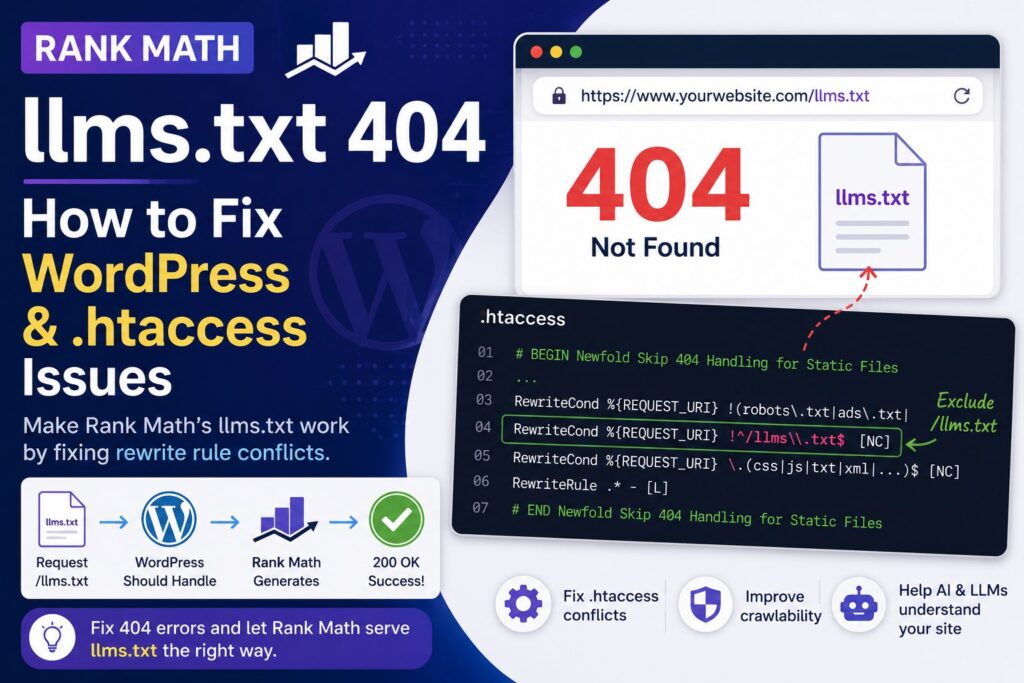
If Rank Math’s /llms.txt returns a 404 error even though the LLMS Txt module is enabled, the problem may be caused by your server’s .htaccess rules rather than Rank Math itself.
On some WordPress hosting environments, an automatically generated .htaccess rule can treat .txt URLs as static files. This can prevent WordPress from processing a dynamically generated endpoint such as:
https://example.com/llms.txt
The fix is to exclude /llms.txt from that static-file rule so the request can reach WordPress and Rank Math.
This article explains how to identify the problem, verify the cause, and apply a targeted fix without removing your hosting provider’s caching or rewrite rules.
What is llms.txt?
llms.txt is a proposed convention for providing a concise, machine-readable overview of a website for large language models and AI agents.
The proposed format uses Markdown and is designed to provide information about a website along with links to useful resources. The specification describes /llms.txt as a root-level URL and defines a structure based around an H1, an optional summary, and sections containing relevant links.
You can read the current proposal at the official llms.txt specification:
It is important to note that llms.txt is currently a proposal rather than a universally adopted web standard. Its purpose is to make important website information easier for AI systems and other automated tools to consume.
Why does Rank Math llms.txt return a 404?
Rank Math can generate the /llms.txt endpoint dynamically. You therefore do not necessarily need a physical llms.txt file in your WordPress installation.
The problem occurs when the web server intercepts the request before WordPress can process it.
A typical WordPress installation uses Apache rewrite rules that send requests for URLs that aren’t physical files or directories to index.php. WordPress can then determine which plugin or WordPress component should handle the request.
However, some hosting configurations add rules that deliberately prevent WordPress from handling requests that look like static files.
This can create a conflict:
/llms.txt
     ↓
Apache sees ".txt"
     ↓
Static-file rule matches
     ↓
WordPress rewrite is skipped
     ↓
404 Not Found
Rank Math never gets the opportunity to generate the response.
How to identify the problem
Start by checking whether Rank Math’s LLMS Txt feature is enabled.
In WordPress, go to:
Rank Math SEO → Dashboard
Make sure LLMS Txt is enabled.
Then check:
Rank Math SEO → General Settings → Edit llms.txt
If the Rank Math interface is available and the feature is enabled, test the URL directly.
Test the llms.txt URL
From Command Prompt or Terminal, run:
curl -I "https://example.com/llms.txt"
A broken configuration may return:
HTTP/1.1 404 Not Found
A working endpoint should return:
HTTP/1.1 200 OK
Content-Type: text/plain; charset=utf-8
You can also retrieve the actual response:
curl -sS "https://example.com/llms.txt"
If Rank Math is generating the endpoint correctly, you should receive text rather than an HTML 404 page.
Check your .htaccess file
If /llms.txt returns 404, open the .htaccess file in your WordPress document root.
You can usually find it here:
public_html/.htaccess
Depending on your hosting setup, your WordPress installation may instead be inside a domain-specific directory.
Before editing .htaccess, make a backup copy.
Look for a hosting-generated section containing wording similar to:
# BEGIN Newfold Skip 404 Handling for Static Files
Inside this section, you may find a condition containing a long list of file extensions:
RewriteCond %{REQUEST_URI} \.(css|...|txt|...|xml|...)$ [NC]
The important part is:
txt
This means requests ending in .txt can be handled as static-file requests.
Why the .txt rule breaks Rank Math
A typical problematic section looks conceptually like this:
RewriteCond %{REQUEST_FILENAME} !-f
RewriteCond %{REQUEST_FILENAME} !-d
RewriteCond %{REQUEST_URI} \.(css|js|txt|xml|...)$ [NC]
RewriteRule .* - [L]
The [L] flag means that Apache should stop processing further rewrite rules for that request.
That matters because WordPress’s rewrite rules generally appear later in the .htaccess file:
RewriteCond %{REQUEST_FILENAME} !-f
RewriteCond %{REQUEST_FILENAME} !-d
RewriteRule . /index.php [L]
The WordPress rule never gets a chance to handle /llms.txt.
For more information about how WordPress works with Apache rewrite rules, see the official WordPress documentation:
WordPress Apache configuration documentation
The fix: exclude /llms.txt from the static-file rule
You do not need to remove the entire hosting provider’s .htaccess section.
Instead, add a specific exception for /llms.txt.
Find the static-file extension condition:
RewriteCond %{REQUEST_URI} \.(css|...|txt|...)$ [NC]
Immediately before it, add:
RewriteCond %{REQUEST_URI} !^/llms\.txt$ [NC]
The relevant section should therefore look similar to:
# BEGIN Newfold Skip 404 Handling for Static Files
<IfModule mod_rewrite.c>
    RewriteEngine On

    RewriteCond %{REQUEST_FILENAME} !-f
    RewriteCond %{REQUEST_FILENAME} !-d
    RewriteCond %{REQUEST_URI} !(robots\.txt|ads\.txt|[a-z0-9_\-]*sitemap[a-z0-9_\.\-]*\.(xml|xsl|html)(\.gz)?)

    RewriteCond %{REQUEST_URI} !^/llms\.txt$ [NC]

    RewriteCond %{REQUEST_URI} \.(css|htc|less|js|js2|js3|js4|html|htm|rtf|rtx|txt|xsd|xsl|xml|asf|asx|wax|wmv|wmx|avi|avif|avifs|bmp|class|divx|doc|docx|eot|exe|gif|gz|gzip|ico|jpg|jpeg|jpe|webp|json|mdb|mid|midi|mov|qt|mp3|m4a|mp4|m4v|mpeg|mpg|mpe|webm|mpp|otf|_otf|odb|odc|odf|odg|odp|ods|odt|ogg|ogv|pdf|png|pot|pps|ppt|pptx|ra|ram|svg|svgz|swf|tar|tif|tiff|ttf|ttc|_ttf|wav|wma|wri|woff|woff2|xla|xls|xlsx|xlt|xlw|zip)$ [NC]

    RewriteRule .* - [L]
</IfModule>
# END Newfold Skip 404 Handling for Static Files
The critical line is:
RewriteCond %{REQUEST_URI} !^/llms\.txt$ [NC]
This means:
Do not apply the static-file bypass to
/llms.txt.
The request can then continue to the WordPress rewrite rules.
Flush WordPress permalinks
After making the change, go to:
WordPress → Settings → Permalinks
You don’t need to change your permalink structure.
Simply click:
Save Changes
This refreshes WordPress’s rewrite rules.
WordPress provides a rewrite-rule flushing mechanism for regenerating rewrite rules when necessary.
Test llms.txt again
Run:
curl -I "https://example.com/llms.txt"
You should now get:
HTTP/1.1 200 OK
Content-Type: text/plain; charset=utf-8
Then retrieve the actual content:
curl -sS "https://example.com/llms.txt"
You should see the generated LLMS content instead of a 404 page.
How to test if Cloudflare is responsible
If your website uses Cloudflare, don’t automatically assume Cloudflare is causing the 404.
You can test the hosting server directly if you know the origin IP.
For example:
curl -k -I --resolve example.com:443:YOUR_ORIGIN_IP \
"https://example.com/llms.txt"
If the origin server itself returns:
HTTP/1.1 404 Not Found
then Cloudflare is not the root cause.
The problem is further down the stack, such as Apache, .htaccess, WordPress, or a plugin.
Check whether other 404 URLs work
Another useful diagnostic is to request a URL that definitely doesn’t exist:
curl -sS "https://example.com/this-page-does-not-exist-123456/"
If that returns your normal WordPress 404 page while /llms.txt returns a different 404 response, that is an important clue.
It suggests that /llms.txt is being treated differently from a normal WordPress URL.
For example:
/this-page-does-not-exist-123456/
        ↓
WordPress
        ↓
Normal 404 page
while:
/llms.txt
        ↓
Apache static-file rule
        ↓
404
That difference points toward a rewrite-rule conflict.
Don’t create an empty llms.txt file
If Rank Math is configured to generate /llms.txt, don’t create an empty physical file just to make the URL return 200.
That can mask the underlying rewrite problem and prevent the dynamically generated endpoint from working as intended.
First determine whether the request is reaching WordPress.
The llms.txt proposal itself is designed around a root-level /llms.txt resource, and the contents are expected to follow a defined Markdown structure.
Don’t delete the entire Newfold .htaccess section
If your hosting provider has added caching or static-file handling rules, deleting the whole section may have unintended consequences.
A targeted exception is preferable:
RewriteCond %{REQUEST_URI} !^/llms\.txt$ [NC]
This preserves the existing static-file handling while allowing the dynamically generated LLMS endpoint to reach WordPress.
You should also avoid manually replacing the entire # BEGIN WordPress section unless you understand exactly what the change does. WordPress can regenerate its rewrite rules.
Could this affect other WordPress websites?
Potentially, yes.
The important point is that the problem is environment-dependent.
If multiple WordPress websites on the same hosting platform have a similar automatically generated .htaccess configuration, they may encounter the same type of conflict when a plugin introduces a dynamically generated URL ending in a file extension that the server treats as static.
However, you should not blindly add the exception to every website.
Check each site’s .htaccess first and confirm that the relevant static-file rule exists.
The exact rewrite configuration can vary between hosting providers, server configurations, caching systems, and WordPress installations.
What about other dynamic file-like URLs?
The same principle can apply to other dynamically generated endpoints that look like physical files.
Examples could include:
/llms.txt
/custom-feed.xml
/example.json
/custom-endpoint.txt
Whether a particular URL needs an exception depends on how the plugin or application registers the endpoint and how the server’s rewrite rules are configured.
Don’t add broad exclusions for every .txt, .xml, or .json URL without understanding the consequences.
A targeted exception is safer.
Is this a Rank Math bug?
Not necessarily.
A Rank Math feature can be functioning correctly while the web server prevents the request from reaching WordPress.
In this situation, there are several layers involved:
Browser
   ↓
Cloudflare
   ↓
Apache
   ↓
.htaccess
   ↓
WordPress
   ↓
Rank Math
   ↓
/llms.txt
A 404 does not automatically mean the problem originates at the bottom of that stack.
The most useful diagnostic is to determine which layer is actually returning the 404.
A practical troubleshooting checklist
If Rank Math’s /llms.txt is returning 404, work through this checklist:
- Confirm Rank Math → Dashboard → LLMS Txt is enabled.
- Open Rank Math → General Settings → Edit llms.txt.
- Test the URL with
curl. - Confirm whether a physical
llms.txtfile exists. - Inspect
.htaccess. - Search for
.txtin static-file rewrite rules. - Look for
RewriteRule .* - [L]. - Add a targeted
/llms.txtexception if appropriate. - Save WordPress permalinks.
- Clear relevant caches.
- Test
/llms.txtagain. - If necessary, test directly against the origin server.
Google recommends using crawlable URLs and clear site structures, while also emphasizing useful, well-organized content and relevant links.
How to validate the final result
The most useful final test is:
curl -I "https://example.com/llms.txt"
A successful response should look approximately like:
HTTP/1.1 200 OK
Content-Type: text/plain; charset=utf-8
Then:
curl -sS "https://example.com/llms.txt"
should return the actual LLMS content.
You can also open the URL directly in a browser:
https://example.com/llms.txt
The response should be plain text/Markdown rather than an HTML 404 page.
Frequently asked questions
Why is Rank Math llms.txt returning 404?
One possible cause is a server-level .htaccess rule that treats .txt URLs as static files and prevents WordPress from processing the request. Check the static-file rewrite rules before assuming Rank Math itself is broken.
Do I need to create a physical llms.txt file?
Not necessarily. If Rank Math is generating the endpoint dynamically, a physical file isn’t required. A 404 can instead indicate that the request isn’t reaching WordPress.
Will flushing WordPress permalinks fix llms.txt?
Sometimes, but not if an earlier Apache rewrite rule intercepts the request. If the problem persists after flushing permalinks, inspect .htaccess.
Is Cloudflare causing the llms.txt 404?
Not necessarily. Test the origin server directly if possible. If the origin also returns 404, Cloudflare is unlikely to be the root cause.
Should I remove the Newfold static-file rule?
No. A targeted exception is safer than deleting the entire hosting-generated section.
What is the important .htaccess rule?
The key exception is:
RewriteCond %{REQUEST_URI} !^/llms\.txt$ [NC]
It prevents /llms.txt from being intercepted by a static-file rule that matches .txt.
Is llms.txt an official web standard?
No. The llms.txt specification is currently a proposal for providing LLM-friendly information about websites. It should therefore be treated as an emerging convention rather than a universally supported web standard.
Final takeaway
If Rank Math’s /llms.txt returns 404 on WordPress, don’t immediately reinstall Rank Math, create a physical file, or change Cloudflare settings.
First determine whether Apache’s .htaccess rules are preventing WordPress from receiving the request.
If you find a hosting-generated static-file rule that includes .txt, add a targeted exception:
RewriteCond %{REQUEST_URI} !^/llms\.txt$ [NC]
Then flush WordPress permalinks and test:
curl -I "https://example.com/llms.txt"
If the response changes from:
404 Not Found
to:
200 OK
Content-Type: text/plain
you’ve confirmed that the problem was a rewrite conflict rather than a missing physical file.
For broader SEO guidance, Google’s SEO Starter Guide is a useful reference for crawlability, site structure, titles, links, and creating helpful content.
